
Pages

Banner 468

Friday, January 20, 2012

Creating Asteroid Text in Photoshop, 2012

0 comments
 
The following tutorial puts up with a few recurring basic techniques, neatly assembled to create an everlasting message. There is nothing wrong with the year 2012.
Read Full Tutorial

Readmore...
Thursday, January 19, 2012

Create a Clean Dark Navigation Bar

0 comments
 
In this tutorial I will show you how to easily create a clean dark navigation bar in Photoshop.
Read Full Tutorial
Readmore...
Wednesday, January 18, 2012

Fun and Unique Banana Text

0 comments
 
BANANA EFFECT TEXT
Go Bananas, go, go, bananas with this really unique text effect. It’s not every day you see a text effect based on a fruit. Have fun with this one!
View the tutorial
Readmore...
Monday, January 16, 2012

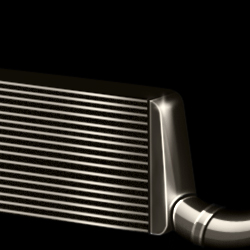
Paint a Realistic Intercooler

0 comments
 
Learn how to paint this car part using Photoshop. This advanced tutorial will show you how to shade and create reflections to create a realistic metal inter-cooler. A PSD of the outline is included to get you started.
Read Full Tutorial
Readmore...

Create a Mac Style Home Icon in Photoshop

0 comments
 

Hello photo shoppers! We occasionally need a home icon for our design project. Commonly, a designer draw with Illustrator, but this time let's create a mac style home icon with Photoshop. The techniques used will be about making shape and playing with layer style. It's not difficult to make this sweet icon. I hope you will get inspiration after following this tutorial. Read Full Tutorial
Readmore...

Using Photoshop to make Metallic Buttons and Menus

0 comments
 
This tutorial uses Gloss Contour, a feature only present in Adobe Photoshop 6.0 and later versions.
Read Full Tutorial
Readmore...

Bright Tinsel Text Effect

0 comments
 
In this tutorial, we are going to use some brushes, layer styles, and different blend modes, to create a super fun looking tinsel-like text effect.
View Full Tutorial
Readmore...
Saturday, January 14, 2012

Create a glowing blue-print style text effect in Photoshop

0 comments
 
In this tutorial, you will learn how to create a glowing and blue-print style typography effect in Photoshop using very simple and effective techniques. We will play with some layer styles and filters to create our text in a very quick time, the steps are much easier to follow, this tutorial requires no user expertise, even a beginner can learn with ease and create some stunning text effects based on this.
Read full Tutorial
Readmore...
Friday, January 13, 2012

Learn to Create Beautiful Lines of Different Shapes

0 comments
 

The purpose of this tutorial is to show you how to create beautiful lines of different shapes that you can add to any image.
Step 1
Open Guitar Silhouette image on Photoshop. Go to Image > Image Size and change width to 1125px and height to 1500px.
Read full Tutorial
Readmore...